
Introduction
Agenta AI makes it possible for teams to build, test, and evaluate AI applications with confidence. What sets Agenta AI apart from other AI development and experimentation tools is its focus on structured testing, versioning, and comparison of prompts, models, and configurations—giving teams clear visibility into how changes impact outputs across real-world scenarios.
Agenta AI is also a developer-first platform designed to bring reliability and control to AI development, helping teams iterate faster, reduce risk, and ship production-ready AI systems with measurable performance and consistency.
Visit Agenta AI
My Role
As the lead product designer at Agenta AI, I was responsible for creating a scalable design system that enabled the product to evolve smoothly as new features were introduced. I worked closely with the CEO, Dr. Mahmoud Mabrouk, and team members Juan Pablo and Arda Erzin, whose deep involvement was crucial in shaping product understanding and implementing new features.
The work began with establishing the core design system and modernizing the existing layout, and later expanded into research-driven redesigns of key areas such as the Playground, Evaluation, and Observability experiences.
Problem
No existing design system
Initial evaluation revealed that the product had been built without a design system in place. This lack of structure resulted in inconsistencies across pages, with no unified approach to layout, components, or visual integrity. The fragmented design made the user experience feel disjointed and highlighted the need for a cohesive design system to establish consistency, scalability, and stronger product identity.
No coherent flows
Navigating the product often felt like relearning the interface from scratch, as each section introduced new patterns and behaviors. This lack of cohesion created unnecessary friction for users, undermining usability and making the overall experience less intuitive.
Scalablility
As the product continued to grow, it became clear that competing in the market would require the addition of new features. However, the absence of a design system posed a major scalability challenge. Without consistent patterns or guidelines, every new feature risked introducing further inconsistencies, increasing complexity for users, and slowing down development. This lack of cohesion underscored the urgent need for a unified design system to support sustainable growth, streamline feature expansion, and maintain a seamless user experience.
Goal
Deliver a consistent, delightful user experience
Establish a robust design system to reduce technical debt and ensure users enjoy a seamless, cohesive experience across the product.
Define clear user journeys
Create intuitive pathways that allow users to navigate the product with clarity and confidence, enabling them to complete diverse actions effortlessly.
Operational efficiency and scalability
Develop scalable design components that streamline internal workflows and support the rapid addition of new services and features, ensuring the product can grow sustainably.
Users
Before we started designing, we deep dive into existing behavioral and purchase data of our users to understand them better.
We focused on identifying what is the job that our customers hire our product for.
User Persona
Details
Name: Michael Turner
Role: AI Engineer
Company Size: Mid-to-Large Tech-Forward Organization (30–200 employees)
Location: Anywhere
Profile Summary
Michael is a hands-on AI engineer responsible for integrating GenAI and LLM-based capabilities into real business applications. His work focuses on practical implementation of prompt engineering, workflow automation, fine-tuning, evaluation, and deploying models into production. He cares about stability, version control, reproducibility, and minimizing operational overhead when working with rapidly evolving AI tooling.
Goals
Build reliable AI prompts that can move from prototype to production quickly.
Maintain clean, manageable prompt versions across teams.
Benchmark and evaluate model outputs consistently.
Reduce time spent setting up evaluations, or deployment pipelines.
Optimize costs without sacrificing performance.
Motivation
Wants tools that give control, transparency, and repeatability.
Wants a smooth workflow from prompt → evaluation → deployment.
Prefers systems that reduce boilerplate and allow focus on core logic.
Likes to collaborate with product and data teams without losing technical rigor.
Pain Points
Prompts scattered across notebooks, Slack threads, or Git repos with no clear ownership.
Stakeholders expect fast iteration that engineering infra can’t keep up with.
Unable to quickly setup evaluations
Unable to setup workflows for existing prompts
Transition
Across two years at Agenta, I led design on the entire platform. The core design system, and the redesigns of Playground, Evaluation, and Observability. Documenting all of that in one case study would either bury the detail or blow past the patience of anyone reading. So I'm zooming in.
The rest of this case study is a deep dive into the Playground. It's the feature where I made the most consequential design decisions, and the one that ended up reshaping who used the product. The work on the other features follows the same approach, and I've linked a gallery at the bottom.
The Playground
This is the main core of Agenta. Write a prompt, run it against a model, see what comes back, change something, run it again. It's the loop the entire platform revolves around. If the loop is slow or confusing, nothing else matters. Users don't get to the evaluation, the deployment, or the observability layers if they give up at the prompt.
When I joined, the Playground worked. But it didn't feel like a workspace. It felt like a settings page that happened to produce text.
Intial design

What was broken
There was no clear direction in the interface, no sense of how to get from A to B. A page titled "1. Modify Parameters" implied a step 2, but you couldn't see one. The action buttons (History, Publish, Delete, Save) sat in a row with no hierarchy, no indication of which was the primary path. Variables, prompts, and outputs were stacked as if they were equivalent things. Nothing on the page told you where the work was supposed to happen.
The deeper issue was that the original had been built without a designer in the loop. Every screen had been engineered into existence rather than designed, which meant the layout reflected the data model instead of the user's job.
Looking at the market
Before redrawing anything, I spent time inside competitor tools. OpenAI's Playground, Anthropic's Workbench, PromptLayer, LangSmith, and a handful of smaller players.
What I found was useful in two opposite ways. On the surface, the market had already converged. Where the "Run" button sits, how model parameters get exposed, where you commit a version. Most tools agreed. That told me the basic grammar of a prompt playground was a solved problem, and reinventing it would just confuse people switching between tools.
But the deeper I looked, the more gaps I found. Nobody handled prompt versioning well. You could iterate, but going back to a previous version was painful or impossible. And nobody had a real chat mode. Every Playground I tested assumed a single-shot completion, which left a hole for anyone building a conversational product (which by then was most of our users).
So the strategy was simple. Don't reinvent what users already know. Build the things nobody else had built.

The core design challenge
The hardest part of redesigning the Playground wasn't visual. It was figuring out where every technical control belonged.
A prompt playground has more knobs than a normal product surface. System prompts, user prompts, variables, model parameters, version history, test cases, traces, evaluators. Each of these is a real thing an engineer needs at some point, and each one is a candidate for cluttering the screen.
The design question wasn't "what should this look like." It was: what does an AI engineer actually do in a session, in what order, and which controls need to be one click away versus tucked behind a drawer? That framing shaped everything that followed.
Iterations
The Playground went through countless distinct iterations over roughly two years. Each draft had a thesis. A specific thing it was trying to solve, rather than just being a visual revision of the last one.
But if I were to divide them into categories, there would be 5 distinct types.
Get on the system
The first pass wasn't about rethinking the experience. It was about translating the existing Playground into the new design system so we had a stable foundation to iterate from. Same structure, new components, new tokens, new visual language. Boring on purpose. You can't redesign a flow on top of inconsistent primitives.

Two modes, not one
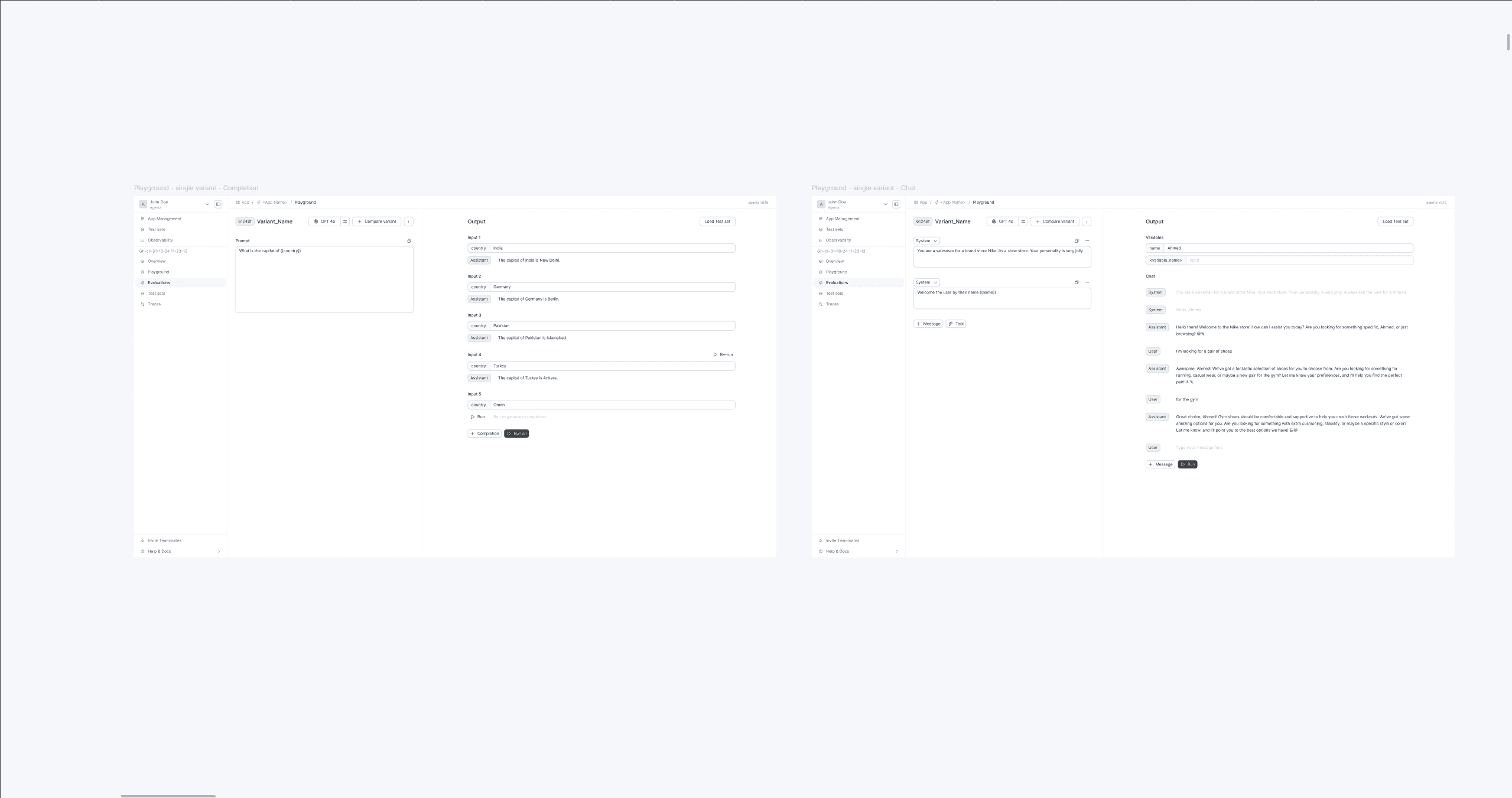
This is where the experience actually started to change. Exploring layouts, I realized the Playground was secretly doing two different jobs. Sometimes a user wants to focus on a single prompt and iterate on it deeply. Other times they want to compare prompts (or models) side by side to figure out which one's actually better.
Those are not the same screen. So I split them. Single mode for focused iteration. Comparison mode for side-by-side testing. Same primitives, different orientations.
Wiring it into the workflow
I worked through where prompts come from (the prompt library), how a user commits a new version, how they deploy it, and what the commit modal needed to ask. This was the draft where I had the most conversations with the frontend and backend leads. A lot of these decisions were really about exposing existing technical primitives in a way that didn't make users learn the data model.
Depth for power users
Traces became visible from inside the Playground. Trace details opened in a drawer instead of yanking you to another page, because if you're debugging a prompt, you don't want to leave it. Test cases could be loaded directly from a test set, so you weren't pasting inputs by hand.
The principle was to keep the user in the Playground while they were iterating, even when they needed information from the rest of the product.
Closing the loop
The last feature I worked on brought evaluators directly into the Playground. Until then, evaluating a prompt meant leaving the Playground, configuring an evaluation somewhere else, running it, and coming back. That broke the iteration loop in the worst possible place, right when a user wanted to know if their change was actually better.
Pulling evaluators inline collapsed the loop. Write, run, evaluate, change, repeat. Without leaving the surface.
Final Design
The shipped Playground keeps the conventions users expect from other tools. Primary actions sit where they sit elsewhere, parameters group the way engineers expect. But it adds the things the market was missing. Real version access, chat mode for conversational testing, inline evaluation, and a layout that treats the prompt as the center of the work instead of one form field among many.


Figma Prototype
NDA signed, can be presented during a call.
Conculsion
Proud
If I were starting this work again, I'd push earlier on the workflow questions. How the Playground connects to versioning, deployment, and evaluation. The mode split was the most visible decision, but final iterations were where the Playground actually became part of a system instead of a sandbox. That integration work could have started sooner.
The bigger lesson was about restraint. The temptation in a feature this dense is to redesign every control. The right move was the opposite. Follow the conventions the market had already settled, and spend the design budget on the gaps nobody else was filling.